The terminal
Every tab is a full xterm.js terminal. This page covers the protocols it implements and the settings that control it.
Protocols
Kitty keyboard protocol. Muxus advertises the progressive-enhancement flag stack (disambiguate escape codes, report event types, report alternate keys, report all keys as escape codes, report associated text), so TUIs such as Neovim, Helix and fish receive full key fidelity: Ctrl+Enter, Shift+Enter, key releases, and modifiers on keys that otherwise have no encoding.
Word jumps on macOS. Option+Left and Option+Right move by word, as in Terminal.app and iTerm2. They send Esc B and Esc F, which bash, zsh, fish and the CLIs of most network devices understand without extra key bindings. They do so in split panes too: focus moves between panes with Cmd+Option+Left … on macOS.
Line jumps on macOS. Cmd+Left and Cmd+Right jump to the start and end of the line, as in VS Code and Ghostty. They send Ctrl+A and Ctrl+E, which bash, zsh, fish and the CLIs of most network devices understand. Full-screen programs get the same keys, so in Vim Ctrl+A increments a number and in GNU screen it starts a command; clearing the chords of Terminal → Jump to line start and Jump to line end in the keyboard sheet passes the keys through unchanged. On Windows and Linux, Home and End already do this, so the two commands have no shortcut until one is recorded in the keyboard sheet.
TERM. Sessions advertise TERM=xterm-256color, which is broadly supported, so remote
terminfo lookups resolve.
Graphics. Kitty graphics, sixel and iTerm2 inline images all render. See Images in the terminal.
Shell integration. Local shells, and bash/zsh SSH sessions, report the command lifecycle with OSC 133/633. Muxus renders that as scrollbar marks: a command that exits non-zero paints its line red in the overview ruler.
Unicode 11 widths and a minimum contrast ratio are enabled, so wide glyphs measure correctly and low-contrast remote colour choices stay readable.
Fonts and colours
The bundled stack is JetBrains Mono, a box-drawing face cut to the same cell, and a
Nerd Font / Powerline symbol face, so Starship prompts, lsd, eza icons, TUI
frames and block-character art render without a local font install. In the desktop
app, the font selector reads the families installed for the current operating-system
user. fontFamily also accepts a custom family name; the bundled text, box-drawing and
symbol faces remain as fallbacks when it is unavailable or lacks a glyph.
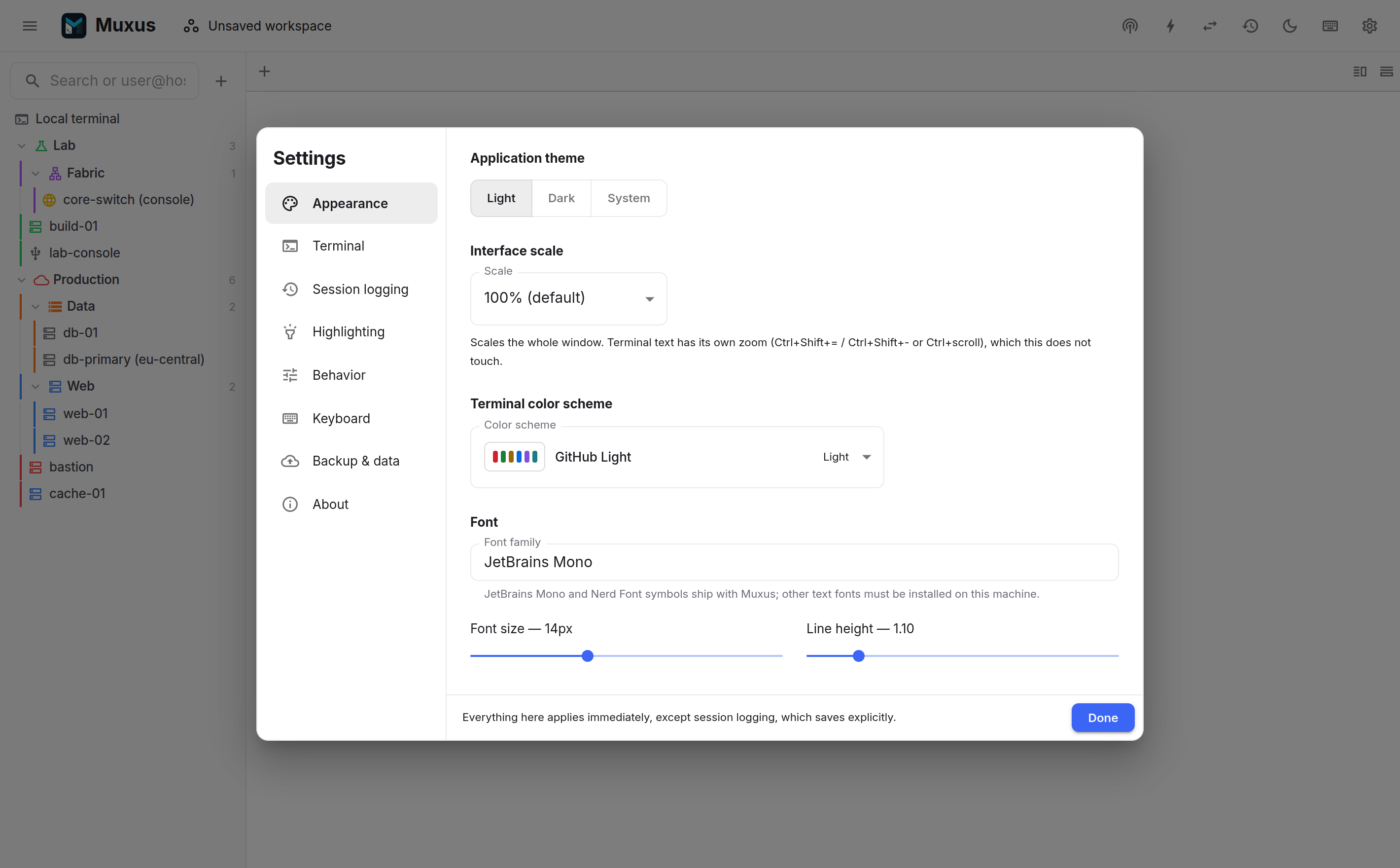
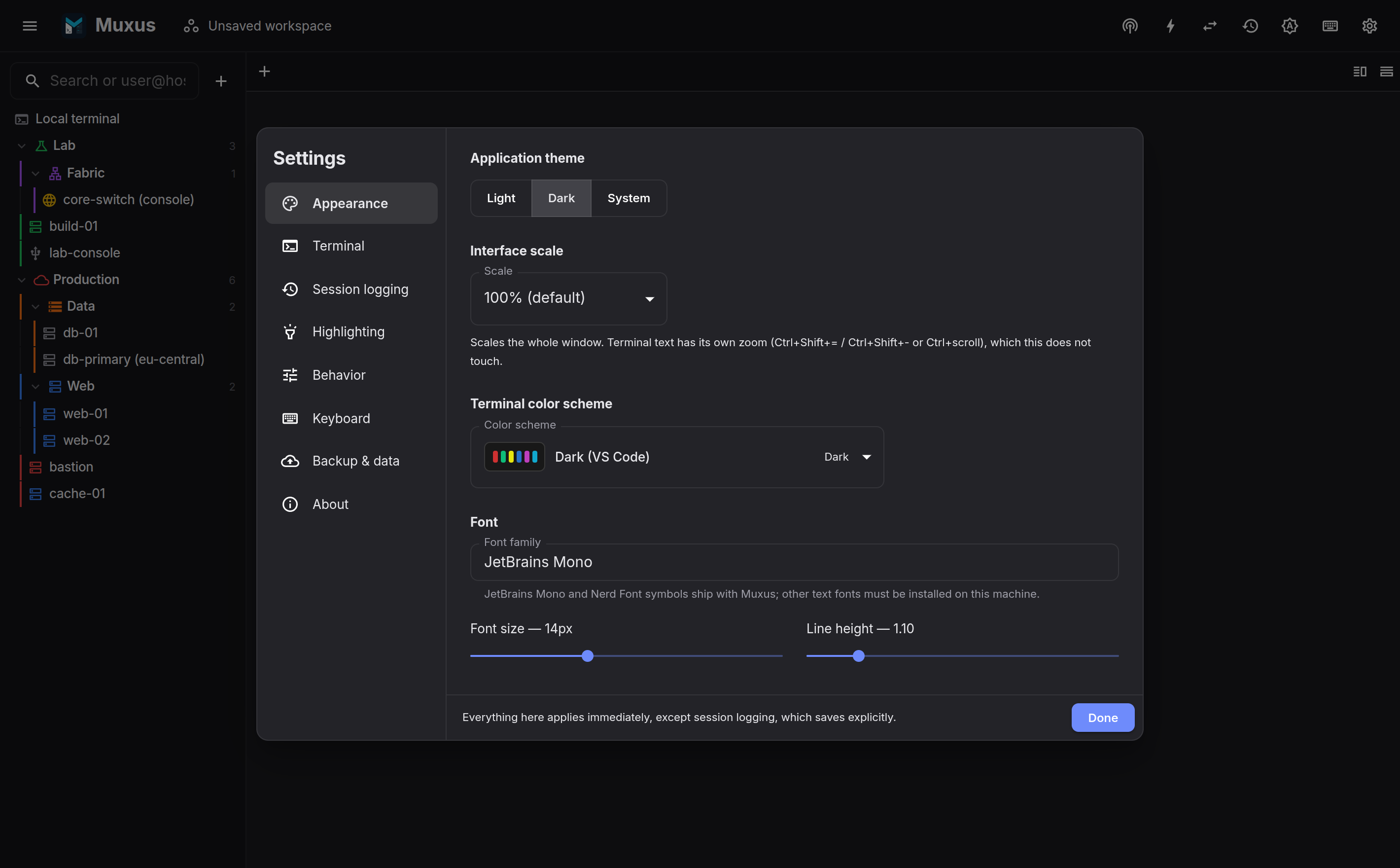
Light schemes: Paper, VS Code Light, GitHub Light, Gruvbox Light, Catppuccin Latte, Solarized Light. Dark: VS Code Dark, Muxus, Dracula, One Dark, Nord, Gruvbox Dark, Catppuccin Mocha, Monokai, Solarized Dark.
Custom colour schemes
Settings → Appearance → Custom color schemes holds schemes of your own. New starts one as a copy of any built-in or custom scheme; Import reads a colour scheme file in one of three formats:
- a Windows Terminal colour scheme, as a single JSON object, a list of them, or a
settings.jsonwith aschemeslist; - an iTerm2
.itermcolorspreset, named after its file; - a scheme file exported from Muxus.
Most published themes ship in at least one of these, so a palette such as Catppuccin Frappé is one import away. The editor shows the scheme on a sample of terminal output and edits the background, text, cursor and selection colours and the sixteen ANSI colours; changes reach open terminals as you make them.
Custom schemes are listed first in the light and dark terminal theme pickers and in each host's terminal appearance, and they are part of a backup. Export scheme writes a file to share with another Muxus installation; importing it again updates the scheme in place. Deleting a scheme returns a terminal theme that used it to its default, and hosts assigned to it follow the application setting again.
Each saved host has a Terminal appearance editor section where its colour scheme, text colour and background colour can override the application defaults. Leave an option on Use application default to keep following the global preference. Host overrides apply to open terminals immediately, which makes sessions easy to identify when the tab strip and sidebar are hidden in focus mode. The same section chooses the command button group the bar shows for the host, its paste pacing, its anti-idle and its keys and echo.
Scheme, font family, size and line height are in Settings → Appearance. Cursor style (block, underline, bar), blink, clipboard behaviour and scrollback length are in Settings → Terminal. Changes apply to every open terminal immediately.
Local shell profiles
Settings → Local shells can save several local launch configurations side by side, such as PowerShell, Command Prompt and individual WSL distributions. A profile can supply executable arguments, a starting directory and commands to run when its interactive shell starts. Saved profiles are launchable from both the hosts sidebar and the quick launcher. On Windows, installed WSL distributions are listed there automatically, next to the saved profiles, with the icon each distribution ships. Right-click any of these sidebar rows to open it, save a distribution as a profile, or jump to its settings.
Per-tab zoom
Ctrl++, Ctrl+- and Ctrl+0, or ++ctrl+wheel++, change the font size of that tab only. The interface scale is a separate preference.
Search the scrollback
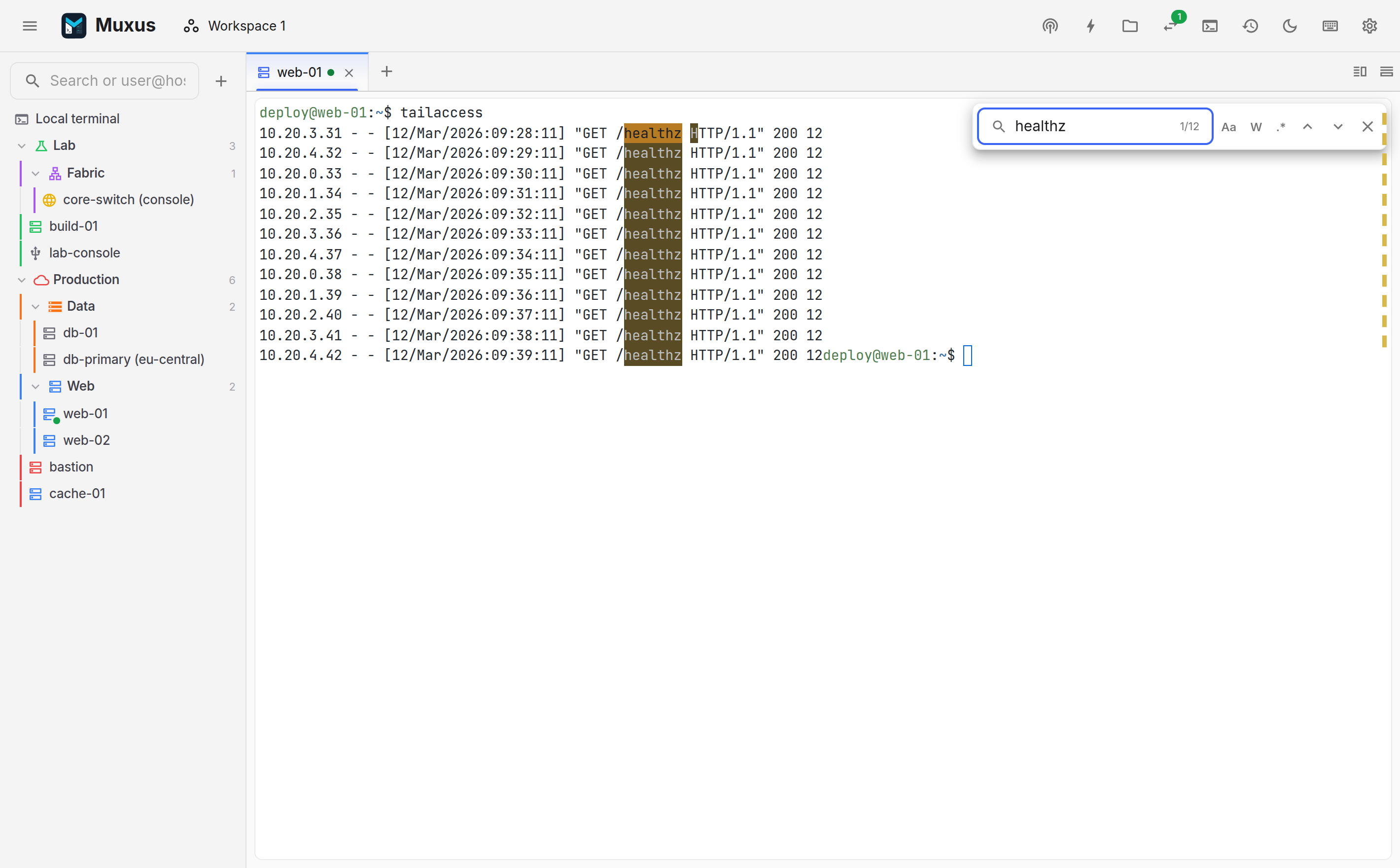
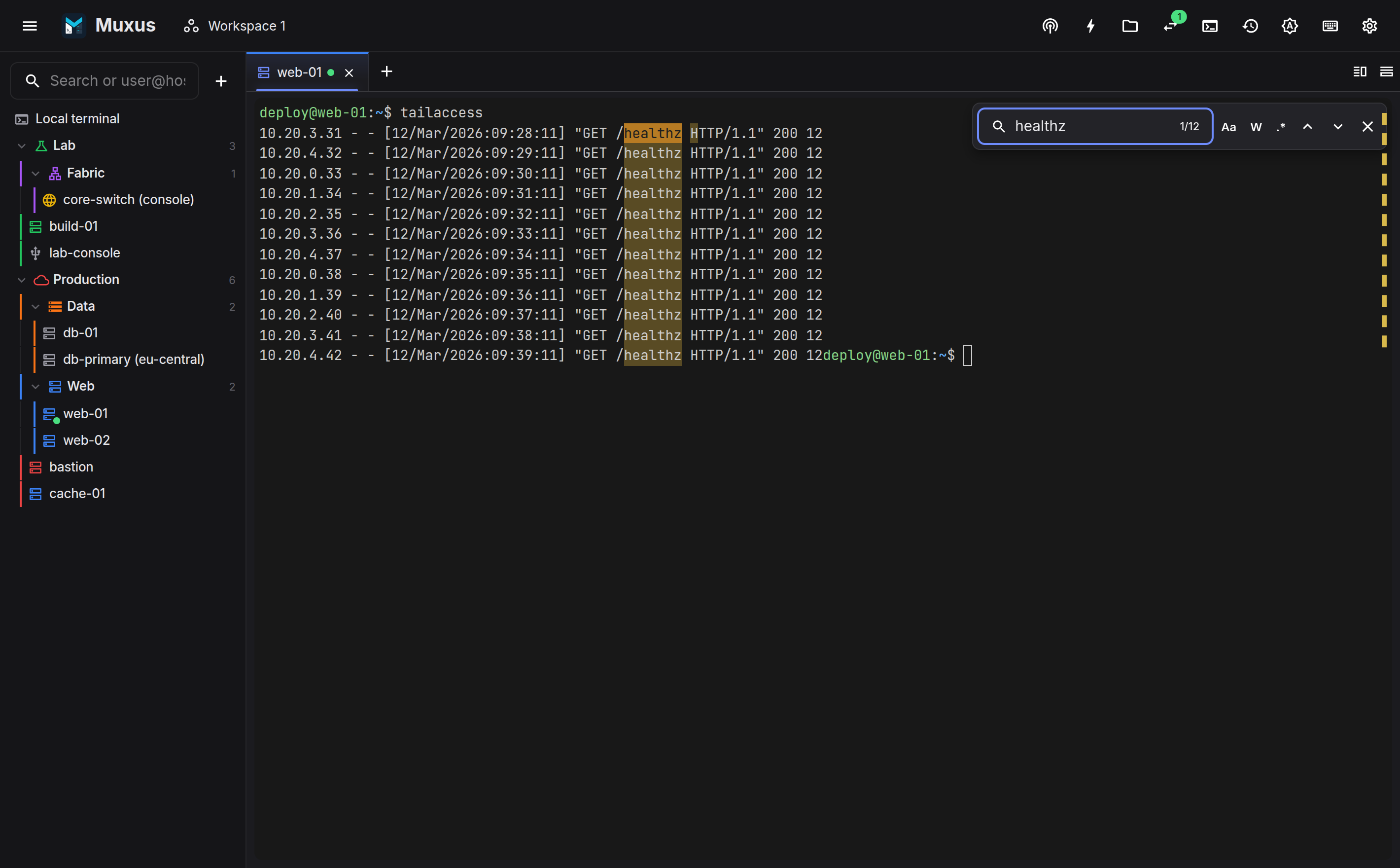
Ctrl+Shift+F opens incremental search with case sensitivity, whole word and regular expression options. Every match is marked in the scrollbar.
Copy, paste and export
- Copy Ctrl+Shift+C, paste Ctrl+Shift+V. Copy on select is optional.
- Right-click is configurable: copy-selection-otherwise-paste (the terminal convention), always paste, or a context menu.
- Select all Ctrl+Shift+A, copy all output and clear scrollback Ctrl+Shift+K are in the terminal-actions menu.
- Export writes the buffer as plain text, or as HTML that preserves the colours.
- Compare with… in the context menu compares the selection, or the whole buffer when nothing is selected, with another terminal, a history record or a file. See Comparing.
Multiline paste is confirmed first
Pasting text that would run several shell commands opens a preview first, so a stray newline in a copied snippet cannot execute part of a script before it is read. It is a setting, and it is on by default.
Invisible and look-alike characters
Text copied from Word, Teams or a wiki can carry characters that look like ASCII but are not, and a device then rejects the line or stores a different value. The paste preview lists each of them with the line and column of its first three occurrences and a count of the rest, and opens for a single-line paste too when it contains one:
| Character | Replace with ASCII |
|---|---|
| No-break space (U+00A0), narrow no-break space (U+202F) | a space |
| Zero-width space, non-joiner and joiner (U+200B–U+200D), word joiner (U+2060), zero-width no-break space (U+FEFF) | removed |
Smart quotes ‘ ’ ‚ and “ ” „ |
' and " |
En dash – and em dash — |
- and -- |
Cyrillic and Greek letters drawn like Latin ones, such as Cyrillic с or Greek ο, in a word that also has Latin letters |
the Latin letter |
Replace with ASCII changes only the listed characters, in the preview, so the result can be read and edited before Paste sends it. Words written entirely in Cyrillic or Greek are left alone. Opening the preview for these characters is a setting, on by default.
Pasting into slow consoles
Serial consoles and older network devices often have small input buffers and no flow control, and their command line finishes one line before it reads the next. A long configuration pasted all at once then loses characters or whole lines. Muxus can type a paste in at a set pace instead:
- Delay after each line, in milliseconds.
- Delay after each character, optional, for devices that cannot keep up within a line.
Both are 0 by default, which sends a paste at once. The defaults are under Settings → Terminal, and a host can set its own under Terminal appearance in its editor: an empty field follows the settings, and 0 turns pacing off for that host. The bulk editor sets them on many hosts at once. Local terminals use the settings. Command buttons are typed at the same pace.
The multiline paste preview shows the host's line delay and how long the paste will take; a delay changed there applies to that paste only. While a paced paste runs, its progress shows over the terminal and as a ring on the tab. Cancel, or a click on the ring, stops it, and so do closing the tab and losing the connection. A paste made while another is running waits for it to finish.
A paste sends each line break as a carriage return, the Enter key, as terminals do: CRLF and LF in the copied text both become one CR, and every CR ends a line. A host whose Enter key sends CR LF or LF gets that instead. The line delay follows each one but the last. With a character delay, every character waits that long, and a line break waits the line delay on top. Each wait starts once the connection has taken the text before it, so on a serial port the delay begins when the line has actually been transmitted.
The pacing runs in the Muxus backend, not in the window, so the rate stays steady while the window is minimized or in the background, where timers in the window are slowed down. When the program reading the paste has turned on bracketed paste mode, as bash and zsh do, one pair of markers encloses the whole paste rather than each line, and cancelling closes it. With multi-execution, each mirrored terminal gets the paste at its own host's pace, independently of the others.
Waiting for the prompt
A fixed delay is either longer than most lines need or shorter than the slowest one. A host can instead have pastes wait for the device's prompt after each line, and stop at the first line the device rejects:
- Open the host's editor and go to Terminal appearance.
- Under Paste pacing, switch on Wait for the prompt after each line.
- Leave the fields empty to use the defaults, or set your own:
- Prompt pattern: a regular expression for the line the device waits on, such as
R1\(config\)#for the promptR1(config)#; parentheses and other characters with a meaning in regular expressions need a backslash. The default,[>#$]\s*$, matches a line that ends in>,#or$, spaces allowed. - Timeout: the longest wait for the prompt after a line, from 100 ms to one minute; 5000 ms by default.
- Error pattern: a regular expression for an output line that rejects the line sent.
The default,
^%\s*(Invalid|Incomplete|Ambiguous), matches lines such as% Invalid input detected.
- Prompt pattern: a regular expression for the line the device waits on, such as
After each line, Muxus reads what the device sends back with colours and other escape
sequences removed, however the output is split. The next line goes out as soon as the device
has started a new line that matches the prompt pattern; the echo of the pasted line never
counts, even when it ends in #. A prompt that ends in another character needs its own
pattern: for one such as [switch], use [>#$\]]\s*$. If the prompt does not come within
the timeout, as during a banner or a command that takes long, the line falls back to the line
delay: the paste moves on once the line delay has passed as well, and the next line waits for
the prompt again. The character delay still applies within each line.
The error pattern is checked against the output lines that arrive after a line is sent, never against what was already on screen. An error line still counts for that line while the paste waits out the line delay after the timeout, and while the next line is typed a character at a time, up to its line break. One that comes after the next line has been sent counts for the line then waiting for its answer, if any. When one matches, the paste stops: nothing more is sent, pastes waiting behind it are dropped, and the terminal and session history note the line, counted within its own paste, and the device's answer:
[paste stopped: Line 2 of 3 (“switchport mode acess”) was answered with “% Invalid input detected at '^' marker.”]
A pattern that takes too long to match also stops the paste, with a note that says so: the patterns get 100 ms for the output that arrives at once.
Only whole output lines are checked for errors: an error is seen once the device ends its line, and one it prints without a line break after it is not seen. Of the output that answers one line, the first 64 KiB is checked for errors; the rest is only searched for the prompt.
A program that has turned on bracketed paste mode, as bash and zsh do, reads the paste as one block and shows no prompt between its lines, so such a paste keeps the line and character delays. With multi-execution, each mirrored terminal waits for its own host's prompt and stops on its own; Cancel still stops them all. The multiline paste preview says when a paste will wait for the prompt, and a change in the editor applies to the next paste, in open sessions too.
Waiting for the prompt is off by default and is available for SSH, Telnet and serial hosts. The bulk editor sets it on many hosts at once, and it is part of a backup.
Sending a text file
Send text file… types a local text file into an SSH, Telnet or serial session, such as a saved configuration for a console. It is in the terminal-actions menu, in the tab's right-click menu and in the quick launcher. It has no shortcut until one is recorded for it under Terminal → Send text file… in the keyboard sheet.
The file is typed as a command button is: never bracketed, at the host's paste pace, after any paste still running, and waiting for the prompt when the host does. On a paced host its progress and Cancel show over the terminal; a host without pacing gets it at once. Each line break, CRLF, LF or CR, is one press of the host's Enter key, so the last line is entered only when the file ends with a line break. With multi-execution, each mirrored terminal gets the file at its own host's pace.
Only UTF-8 text is typed, which includes plain ASCII. A file with NUL bytes or invalid UTF-8, such as a program, an archive or text saved as UTF-16 or Latin-1, is refused, and so is a file larger than 1 MB; nothing is typed then.
Keeping idle sessions open
Network devices and console servers close a line that has had no input for a while, such as
a VTY or console port with an exec-timeout. SSH keepalives do not count as input there. A
host can have Muxus type into its idle sessions instead:
- Open the host's editor and go to Terminal appearance.
- Under Anti-idle, switch on Type into idle sessions.
- Set After: the seconds without input, from 10 to 3600.
- Enter the Text. It is typed exactly as entered, spaces included, with nothing added; control characters such as a tab are not accepted.
- Tick Press Enter afterwards only when the device needs it; it presses the host's Enter key. The editor warns that Enter also answers whatever the device is asking at that moment, such as a confirmation before a reload, and runs a command left half-typed for longer than the interval. In a full-screen editor or pager, the text and Enter land there.
On Telnet and serial hosts, where you log in after the session opens, the first wait starts at the first input, yours or a login sequence's, so a session left at a login prompt never gets the text as a username.
Any input starts the wait over: keystrokes, pastes, command buttons, vault secrets and login sequence steps. Send BREAK is a signal, not input, so it does not. While a paced paste or a login sequence runs, the wait is held, and a full interval starts once it has finished. The Muxus backend types the text into that session only, so multi-execution never mirrors it, and it keeps going while the window is minimized. Session history records it like typed input, that is, only when input capture is on.
Anti-idle is off by default and is available for SSH, Telnet and serial hosts. The setting is read when a session connects, so a change applies to sessions opened or reconnected after saving. The bulk editor sets it on many hosts at once, and it is part of a backup.
Dropping files
Files and folders dropped onto a local terminal are typed at the prompt as their full paths,
quoted for the shell: single quotes for bash, zsh and other POSIX shells, fish's own escapes,
single quotes for PowerShell and double quotes for cmd.exe. A WSL shell gets the path
inside the distribution, such as /mnt/c/Users/me/report.pdf. Nothing runs until you press
Enter. Paths are only known in the desktop app; the browser version cannot type them.
Dropping onto an SSH terminal uploads the files instead; hold Shift to type the local paths there too.
Keys and echo
By default Muxus sends DEL (0x7F) for Backspace and a carriage return for Enter, as xterm does, and shows only what the far end echoes. Some consoles expect otherwise: a bootloader or embedded board that erases on ^H or ends lines on LF, or a device that does not echo what it receives. Keyboard and echo, under Terminal appearance in the editor of an SSH, Telnet or serial host, changes four things for that host's sessions:
| Setting | Choices | Effect |
|---|---|---|
| Backspace sends | DEL (default), ^H | The byte Backspace sends. SSH sessions also announce it to the server as the erase character (VERASE) when they open |
| Enter sends | CR (default), CR LF, LF | What Enter sends, what line breaks in pastes and command buttons become, and the Enter that secrets, login sequences and anti-idle press |
| Implicit CR in every received LF | Off (default), on | A line feed from the device also returns to the start of the line, for output that ends lines with LF alone |
| Local echo | Off (default), on | Shows what you type in the terminal, without sending anything more |
Only the plain keys change: Ctrl+Backspace still sends ^H and Alt+Backspace ESC DEL, as before. A program that has turned on bracketed paste mode, such as bash or zsh, reads a paste as text rather than keys, so inside the markers line breaks stay CR. Telnet sends every line end as the Telnet newline, CR LF, unless the server switches the session to binary mode, so Enter sends only changes a Telnet session in binary mode.
Local echo shows printable characters as they are typed, moves to a new line on Enter and erases the character before the cursor on Backspace. Pastes and command buttons are shown the same way when they are sent; a paced paste appears at once while the device still receives it at its pace. Other control keys, Tab, the arrows and function keys are sent but not shown, and neither are secrets, which the window never sees. A device that does echo shows everything twice.
Open sessions follow a change as soon as it is saved, except the SSH erase character, which
a session announces when it opens. An OpenSSH host's settings apply to sessions opened by its
alias; a session opened as user@alias or alias:port, from quick connect or a link, keeps
the defaults. When more than one Host block in ~/.ssh/config names the alias, the settings
come from the host among them whose name sorts first. With
multi-execution, each mirrored terminal sends Backspace
and Enter as its own host's settings say. The
bulk editor sets them on many hosts at once.
Keyword highlighting
Highlighting rules colour keywords in every terminal, such as ERROR on red and
WARN on amber. Each rule is one row: its colours (click the preview to change them), an
optional name saying what it is for, the keyword, and three toggles: Aa matches case,
ab matches whole words only, and .* treats the keyword as a JavaScript regular
expression, such as \b(?:up|down)\b, ^Error:.* for a whole line, or
(?<!no )\bshutdown\b to skip a negated command. An invalid pattern is flagged in the
editor and matches nothing until it is fixed.
Regular expressions are matched in a background worker, so a pattern that backtracks for too long cannot freeze the terminal. If one pattern keeps the worker busy for more than a quarter of a second, Muxus pauses it for the rest of the session, shows a notice, and marks it in the editor; the other rules keep working, and changing the pattern tries it again.
Edit as JSON opens any rule list as text, which is quicker for bulk changes or for
pasting rules from elsewhere. keyword and foreground are required; name, background,
regex, caseSensitive and wholeWord are optional. Apply checks the whole list and
names the first rule with a problem; nothing changes until it applies cleanly.
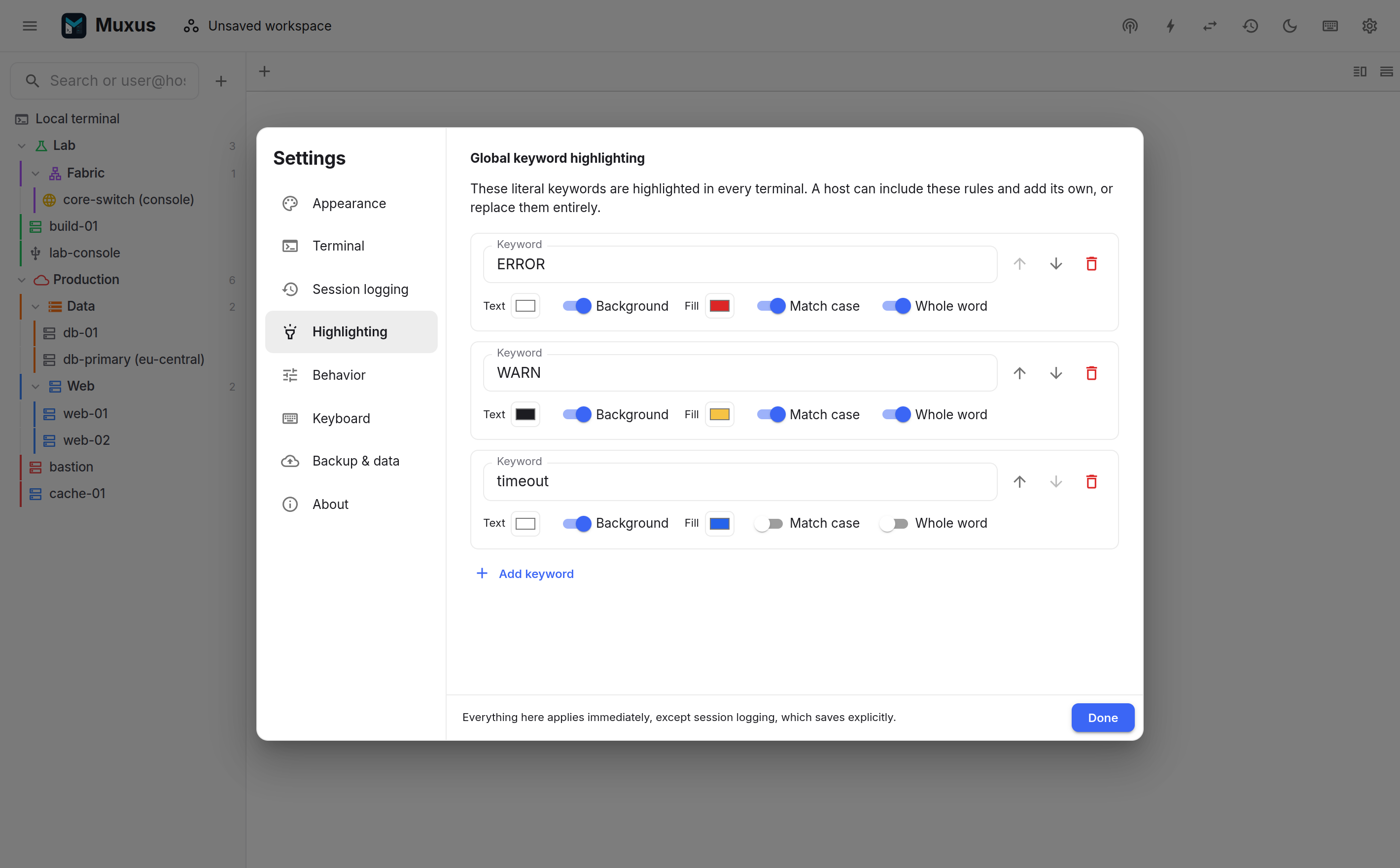
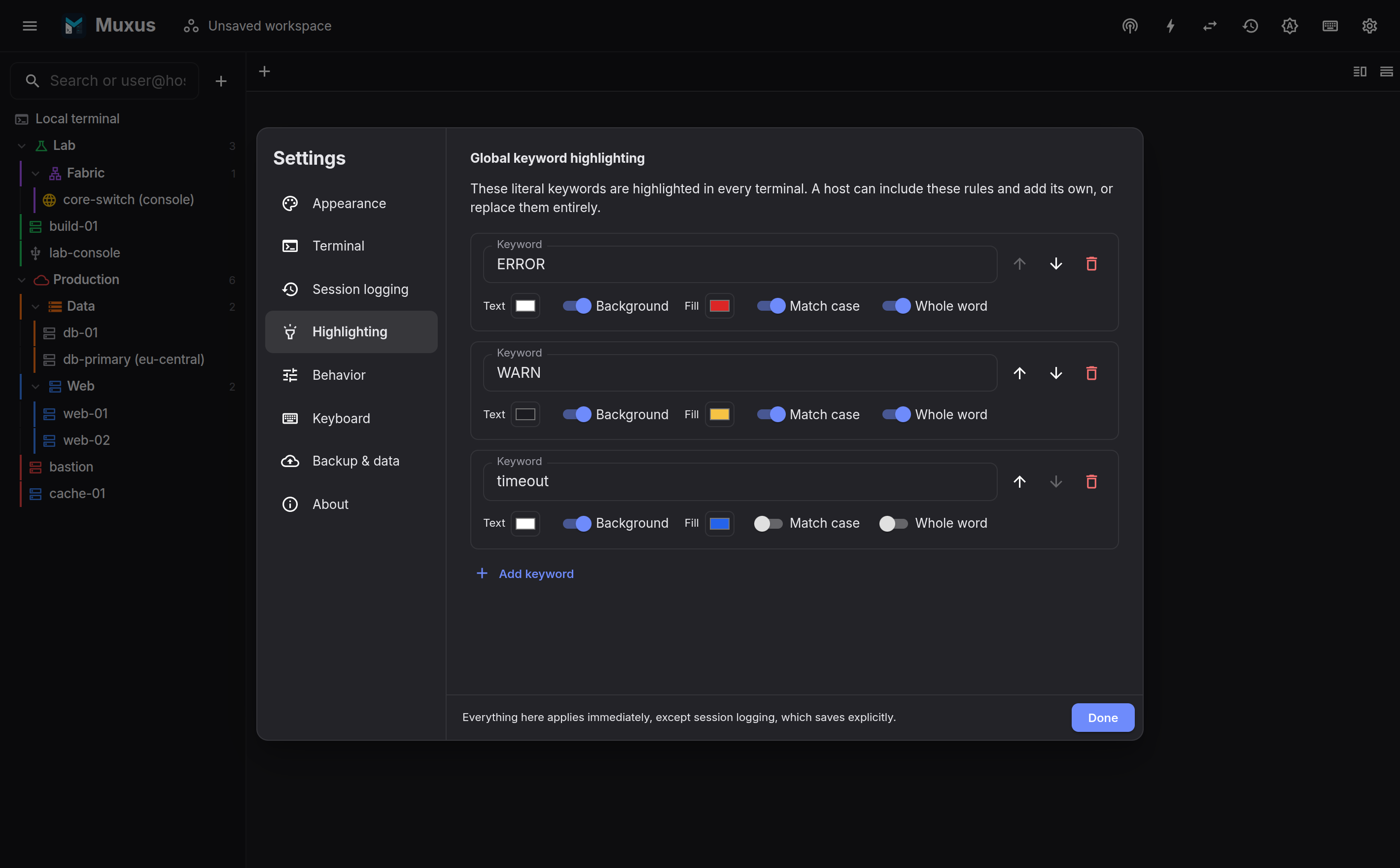
A named highlighting profile can hold a platform-specific rule set and be assigned to any number of SSH, Telnet or serial hosts. Profiles can be imported and exported as JSON files from Settings → Highlighting, one at a time or with Export all, so a rule set can be shared without recreating it. Editing a profile updates every assigned open terminal.
Muxus ships two profiles, Nokia SR OS and Nokia SR Linux. They colour operational and administrative states, BGP session states, alarm severities, CLI errors, IPv4/IPv6 and MAC addresses, ports or interfaces, and the configuration-mode context of the MD-CLI and SR Linux prompts. They are ordinary profiles: assign them to your routers, edit them, and export them like any other. Built-in adds one back after it was deleted, or resets it to the shipped rules; hosts assigned to it keep the assignment.
Files exported from a profile that uses regex rules are marked as version 2, so an older Muxus release refuses them instead of matching the patterns as literal text. For the same reason, a version 1 file that contains regex rules is rejected on import.
A host can also carry its own additional rules. It can combine global, profile and host rules, or disable the global set and use only its profile and host rules. See the Highlighting section of the host editor.
Command buttons
Frequently used commands can be saved to a one-click bar above the terminal, configured to run immediately or to be inserted for review. They can be colour-coded and sorted into groups, such as one per vendor, and a host can switch the bar to its own group.